OncoKB
All ConfigMaps and Secrets for oncokb-eu cluster are under oncokb-deployment repo. For all other cluster, config/secrets can be found in portal-configuration repo
System Architecture
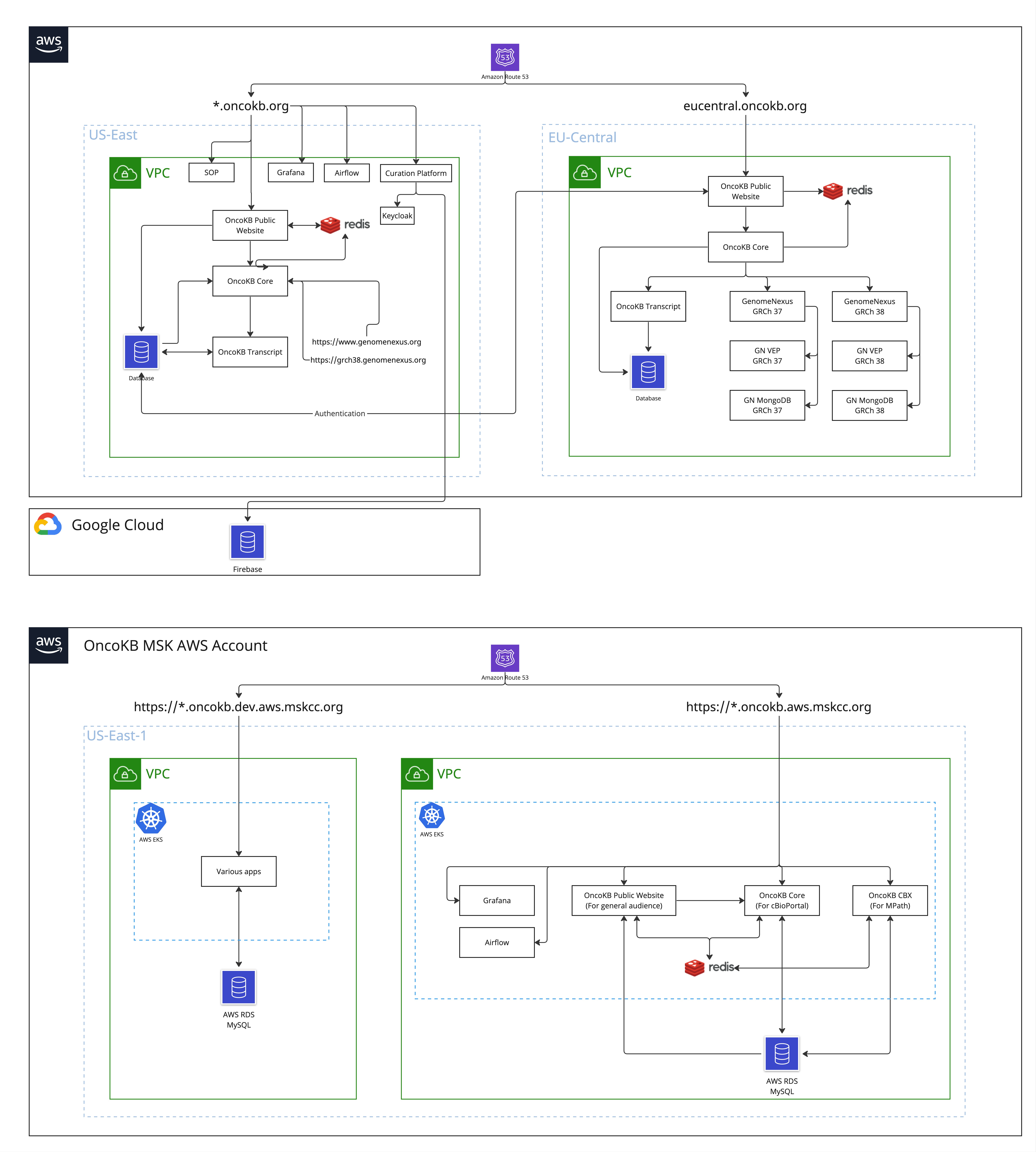
Editable board is located here https://miro.com/app/board/uXjVMTJ_gKI=/
Clusters
-
cbioportal-prod/oncokb This is the shared account with cBioPortal which serves the OncoKB public apps that running behind oncokb.org. The cluster is under us-east-1.
-
oncokb-eu/default This is a cluster served under eu-central-1 region.
-
oncokb-dev/default This is the MSK dev cluster. Account: msk-oncokb-dev (762447640649)
-
oncokb-production/default This is the MSK production cluster. Account: msk-oncokb-prod (084637913395)
Manage clusters
- All clusters are served under AWS/EKS. We use ArgoCD to sync and deploy applications.
- All clusters use the default namespace to serve apps except the cbioportal-prod which is
oncokb. - OncoKB cluster versions are managed by Terraform.
- We use helm(v3.5.2) to install charts.
Services
Redis
- We currently only use Redis Cluster in production.
- Managed by ArgoCD. Find appropriate cluster here
Airflow
- We have two versions of airflow running.
- airflow.oncokb.org
- airflow.oncokb.aws.mskcc.org
- The dags are located at https://github.com/oncokb/oncokb-pipeline/tree/master/oncokb-airflow/oncokb
Prometheus/Grafana
- Managed by ArgoCD, see HERE
Notes
Creating a new subdomain
To add a subdomain of oncokb.org, please follow the steps below:
-
Add host under spec.hosts in ingress/ingress_oncokb.yml
-
Under the same yaml file, add rule to handle traffic to the subdomain
-
Add k8s Service and Deployment under oncokb folder. The service name should be the same as the step 2. You can use oncokb/oncokb_public.yaml file as an example
-
Commit changes to GitHub
-
Login to ArgoCD Web and sync